Use Analytics to monitor requests to your released prompts and inspect the evidence behind their scores. A production policy chooses which new requests to score and which rules to apply. This guide continues with Support ticket triage, its released v2, and the required Support ticket contains JSON rule. Complete Versioning and releases and Evaluation rules first if you have not prepared those resources.

Choose what to inspect

Open Analytics in Prompt Studio and select your prompt under Prompt filter. You can also select All prompts to inspect aggregate activity; select a specific prompt to manage policies or filter its versions. An organization owner or admin can activate and pause production policies. Running requests still incurs generation cost; LLM judge scoring adds its own model usage.

Configure production scoring

1

Set the policy's scope and budget

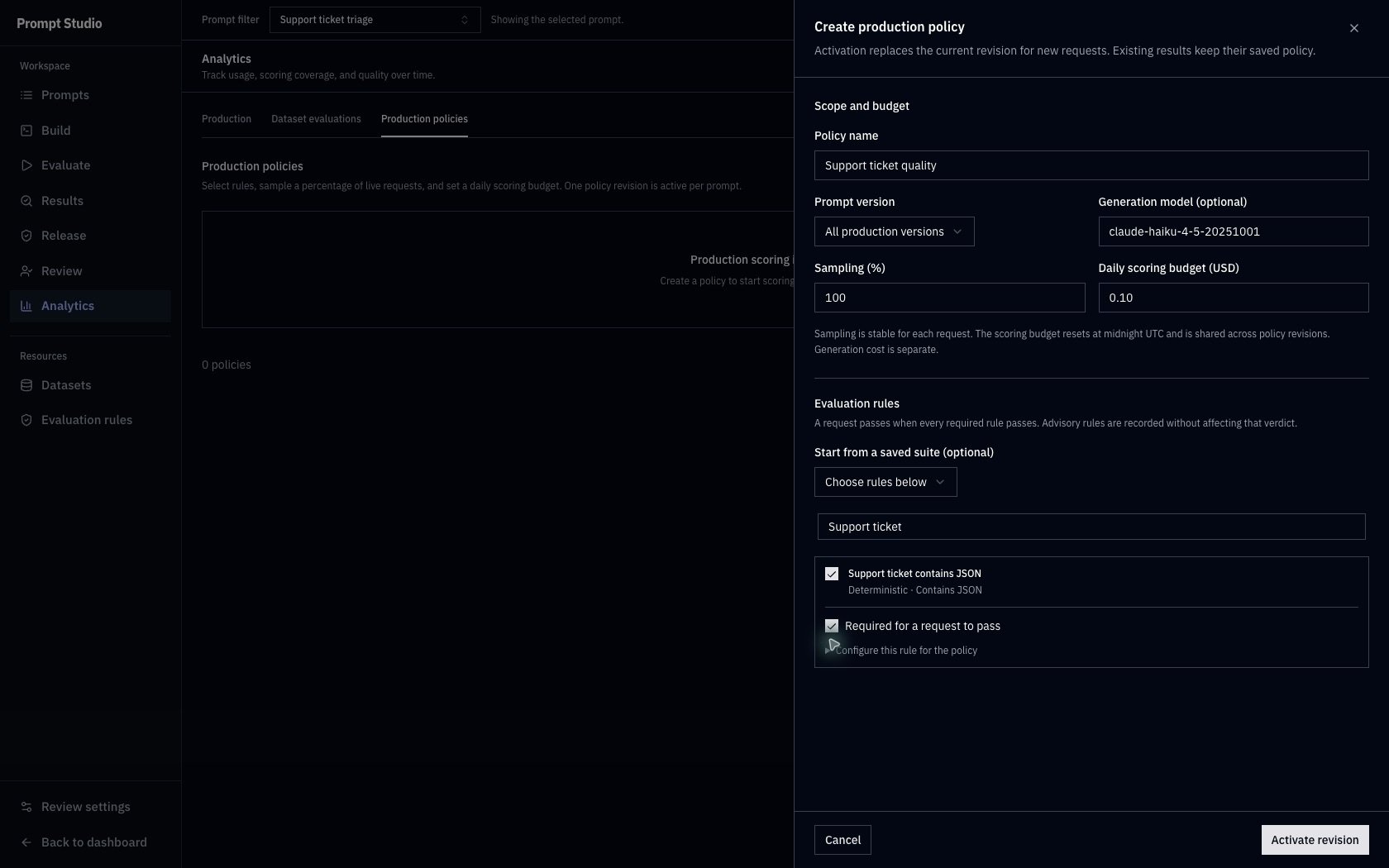
Open Production policies and click Create policy. For the synthetic example, enter:Use the exact generation model ID from your own prompt requests. Leave the model field blank to match all models, or choose a specific prompt version to narrow the scope.100% sampling makes this small example easier to inspect. At lower percentages, matching requests outside the sample remain unscored. Sampling is stable for each request.
2

Choose the required rule

Search for and select Support ticket contains JSON. Keep Required for a request to pass checked.You can start from Start from a saved suite (optional) instead of selecting rules individually. Expand Configure this rule for the policy to adjust its settings for this policy. Those changes do not edit the library rule.A policy accepts 1–10 rules. At least one must be required for requests to receive a pass/fail verdict. Advisory results are recorded without changing that verdict.
3

Activate the revision

Click Activate revision and confirm the policy is Active.Activation saves the rule definitions and applies to new matching requests. It does not score earlier requests retroactively. Editing a library rule later does not change this saved policy revision.
Create production policy for Support ticket quality with all production versions, the Haiku model, 100 percent sampling, a 10-cent daily scoring budget, and the required Contains JSON rule.

The example samples every matching request and uses one required deterministic JSON rule. The daily scoring budget is separate from generation cost.

For an LLM judge, configure its criteria, threshold, API key, and judge model. Judge calls incur model usage. Deterministic rules do not add model calls; the example’s recorded scoring cost is zero.Production requests have no reference answer for Semantic similarity. That method is skipped in production; making it required leaves the request unscored. Use it for dataset evaluations with expected outputs.Set a positive daily scoring budget up to $100. The budget resets at midnight UTC and is shared across revisions of the prompt’s policy. Creating a new revision does not reset the day’s spending. The budget controls scoring, not the model call that generates the response. Scoring can stop when the remaining budget is insufficient or priced usage is unavailable; inspect the record’s reason.

Generate requests and refresh

Send new requests to the released prompt using Chat Completions with traceport.prompt. In Prompts, use Copy prompt slug to obtain the saved slug for your instance. Send each ticket as traceport.prompt.variables.ticket_text. Use the login ticket from the Quickstart and the password-reset ticket from Results and comparison. Calling Run prompt in Build will not create production activity. Return to Analytics → Production and click Refresh. Scoring runs asynchronously, so a new request can appear before its required scores are available. Refresh again after processing; the view does not continuously refresh itself.

Read pass rate and coverage together

The captured example contains three actual requests: login and password reset while policy r1 was active, followed by a billing request while scoring was paused. All three used released v2. A new revision was then activated with the same settings for future requests. A dash means the denominator is zero. Read the sampled count and the pending, error, skipped, and no-required-rule counts below the metrics. These scoring counts describe the eligible population; they do not make unmatched requests disappear from usage. Treat partial pricing or Unavailable as incomplete cost information. Totals include the prices that were recorded.
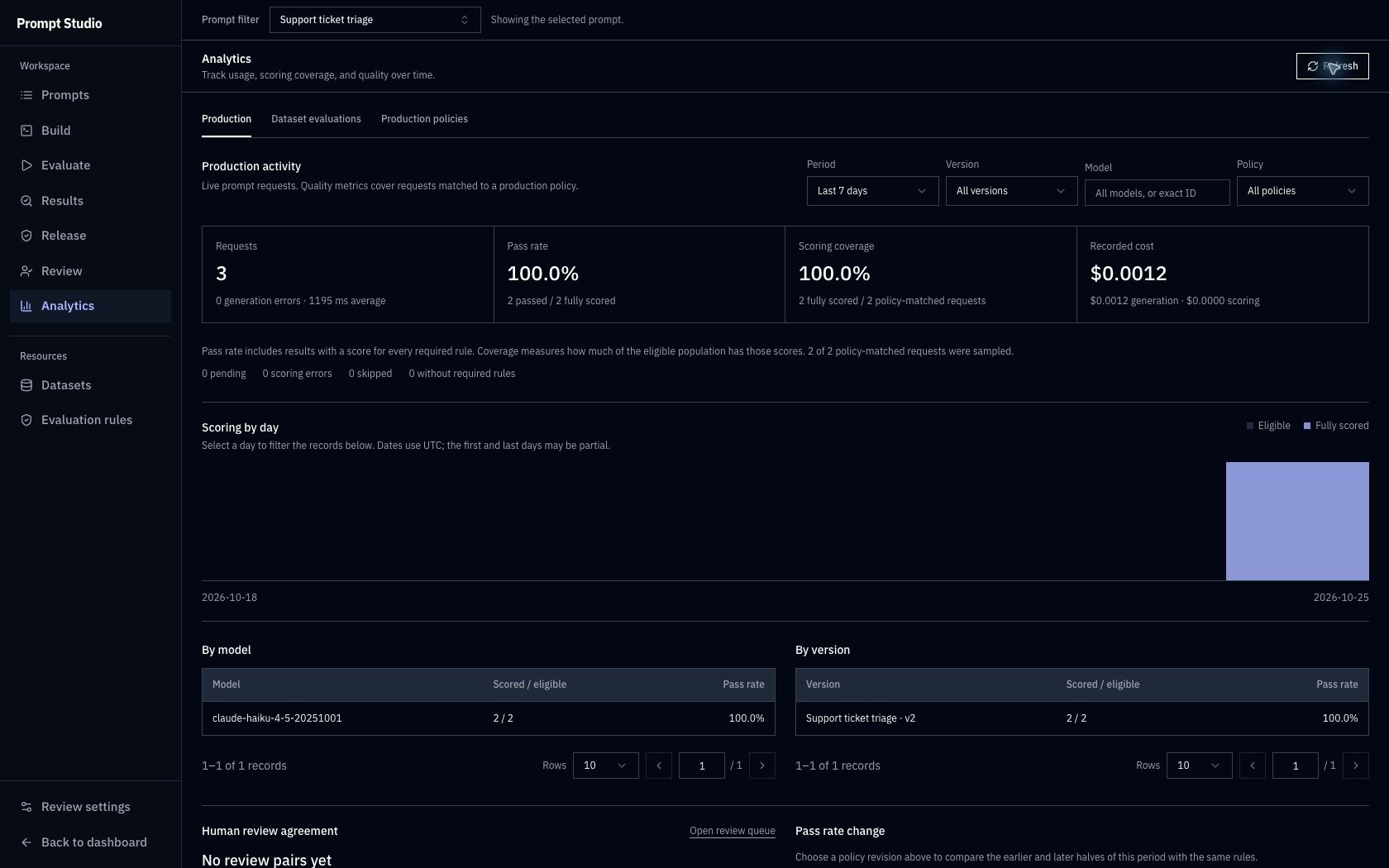
Production analytics for support-ticket triage showing three requests, two passed out of two fully scored, two fully scored out of two policy-matched requests, and 0.0012 dollars recorded cost.

Three requests were generated, but only two matched a scoring policy. Both eligible requests were fully scored. These small, recorded JSON-check results do not establish classification accuracy.

The Contains JSON rule checks whether JSON can be found in the response. It does not verify category, priority, or every instruction. Review the v1 priority mismatch that passed this rule before interpreting a high pass rate as overall quality.

Inspect an exact request

  1. Scroll to Request records and open a row. Use Outcome to find Passed, Failed, Unscored, or Generation / scoring error records.
  2. Check the prompt version, model, policy revision, and separate generation/scoring costs. Read Generated output and each rule’s required/advisory status, score, verdict, and reason.
  3. Expand Input variables and messages to see the actual inputs and rendered template. Expand Record identifiers when you need its exact execution or trace ID.
  4. Click Open trace to inspect the linked generation request. The password-reset example opens its production trace and the same prompt execution.
The record URL reopens that exact record. Send to review is available for completed production outputs whose content is still retained. Follow Human review to record independent decisions and resolve disagreements. These decisions do not replace the recorded automatic scores.
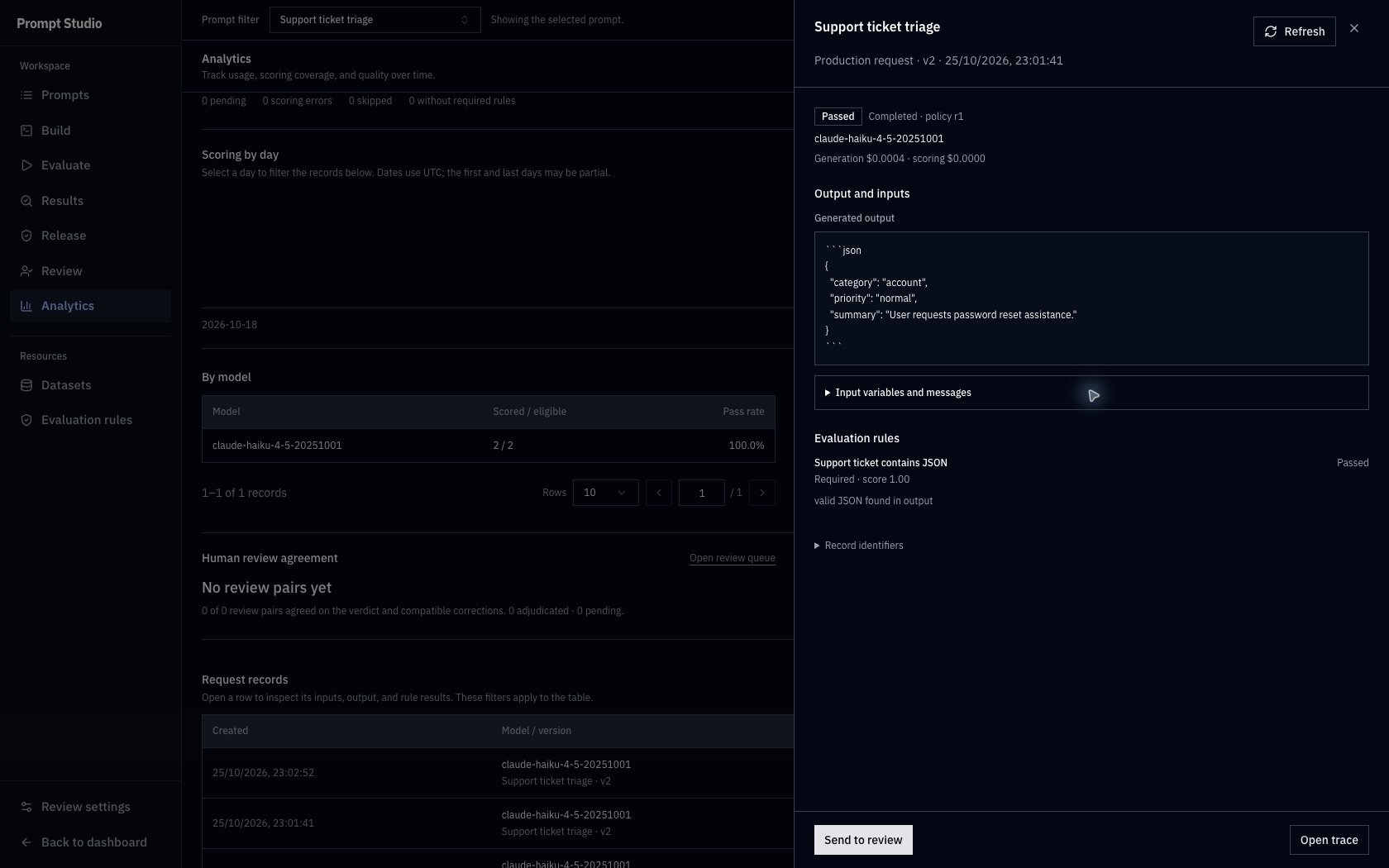
Production password-reset record showing account category, normal priority, a passed required JSON rule with score 1.00, separate costs, and an Open trace action.

The recorded password-reset request used v2 and policy r1. Its required JSON check passed with score 1.00; the actual output and generation trace remain available for inspection.

Distinguish failure from missing scores
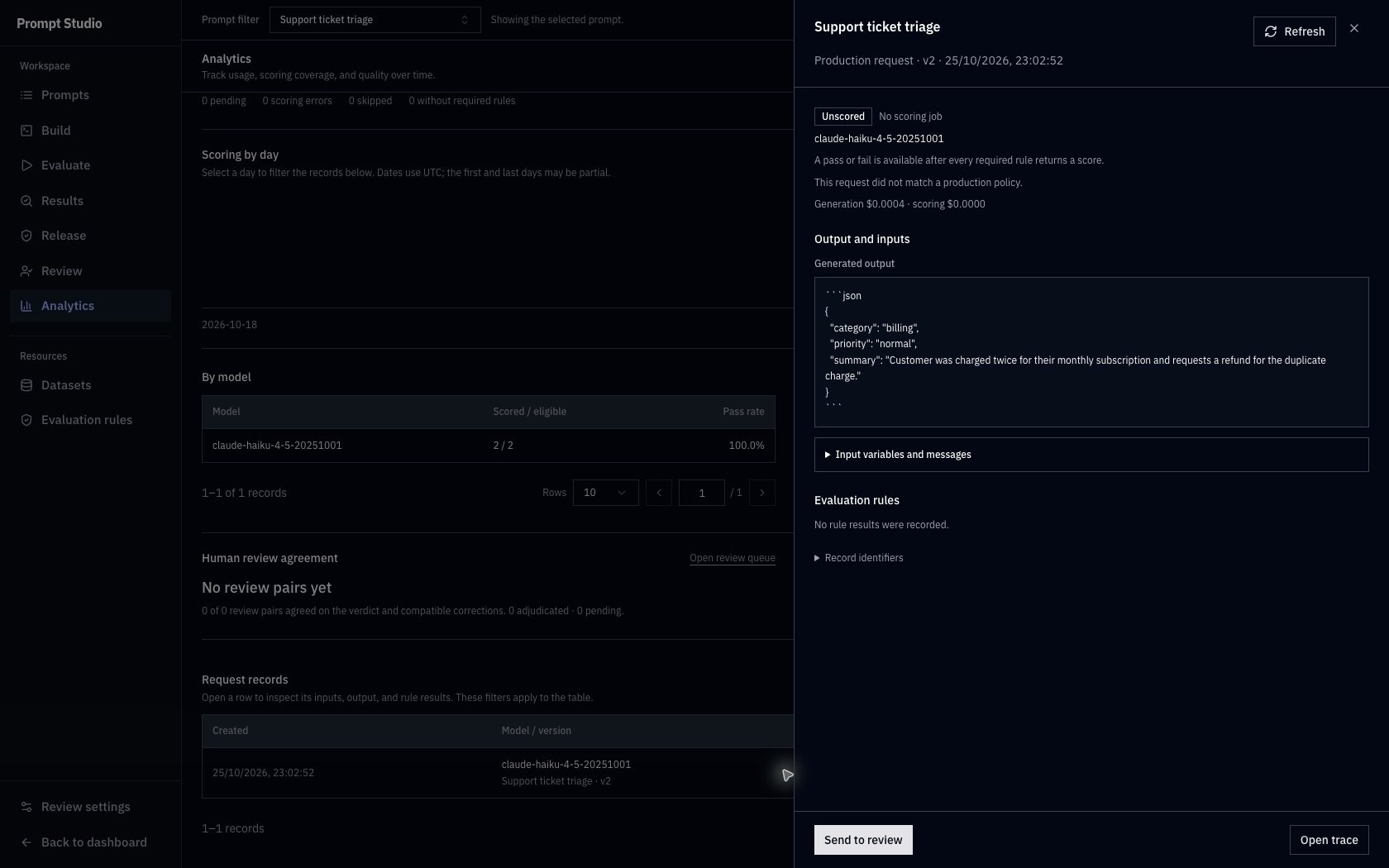
The billing example completed generation while scoring was paused. It shows No scoring job, no rule results, and the reason This request did not match a production policy. Its output is available, but it has no automatic pass/fail verdict.
Unscored billing production request with a generated JSON response, No scoring job status, no matching production policy, and no recorded rule results.

The billing response was generated successfully while scoring was paused. Unscored describes missing evaluation evidence, not a failed response.

If retention has expired, the record shows that its input/output content is unavailable while retaining recorded scores. Review and trace access still depend on the records available to your account.
  • Period selects the last 7, 30, or 90 days. Refresh updates the end of the window and reloads results.
  • Version, Model, and Policy narrow the analytics population. Enter an exact model ID, then press Enter or click the apply checkmark. Choose a policy revision to inspect evidence produced under those saved rules.
  • Click a By model or By version row to apply that filter. Scoring by day uses UTC dates; the first and last days can be partial.
  • Selecting a day or Outcome filters the records table. It does not recalculate the headline metrics. In Dataset evaluations, Dataset split also filters the case table.
Pass rate change needs a selected policy revision. It compares the earlier and later halves of the selected period using that revision’s rules, in percentage points. Both halves need scored results; otherwise you see Not enough scored results. Request content can differ between periods, so this does not isolate the effect of a prompt change. Use compatible dataset comparisons to compare fixed cases.Human review agreement reports agreement between review pairs on their verdicts and compatible corrections, with adjudicated and pending counts. It does not measure automatic scoring accuracy. No review pairs yet means there are no pairs to compare; use Open review queue to inspect the review workflow.

Revise or pause scoring

Open Production policies and click a row to inspect its saved scope and rules. Click New revision, Create new revision in its detail panel, or Create revision from this in a row’s menu to prepare another revision. Review the settings and click Activate revision. Only one revision is active per prompt. New matching requests use it; historical records keep the policy revision and rule definitions used when they were scored. Use Pause scoring in the active policy’s row menu or detail panel to stop new scoring work. Judge calls already running can finish. To start again, create and activate a new revision. Requests made during the pause are not retroactively scored by that later revision. Pausing does not stop prompt generation or its costs. For the recorded example, r1 scored two requests, scoring was paused for the billing request, and r2 was activated with the same settings. The two scored records still identify r1.

Compare with dataset activity

Select Dataset evaluations to inspect offline coverage, pass rate, cost, and case records separately. The existing v1/v2 eight-ticket evaluations provide 16 case records across both versions. Filter Version to inspect cases for that version; several runs can share a version. Open a case and choose Open evaluation result for its detailed run evidence. Use this view to track evaluation activity over time. Use Results and comparison for paired outputs and regressions on matching cases.